The Values System
The values system provides an interface for working with dynamically calculated
values that can be constructed across multiple components.
A “value” is extremely general in this context and can be anything at all. However,
by far the most common types of values used in a Vivarium simulation are
attributes. Attributes are simulant-specific characteristics
and are stored in the population state table.
Examples of attributes include things such as age, sex, blood pressure, and any
other type of information of interest that describes each simulant.
Note
The values system is distinct from the population management system although they are intimately related. While the population system is responsible for managing and providing access to the state table, the values system is responsible for populating the columns of said state table with attributes.
As mentioned above, values and attributes are dynamically calculated as needed throughout
the simulation. The most prominent example is any time during the simulation a component
requests some information from the state table, the desired attributes are calculated.
The producers of these values - the things that actually do the calcuations - are
pipelines for generic values
and attribute pipelines
for attributes.
What are pipelines?
We can visualize a pipeline as the following:
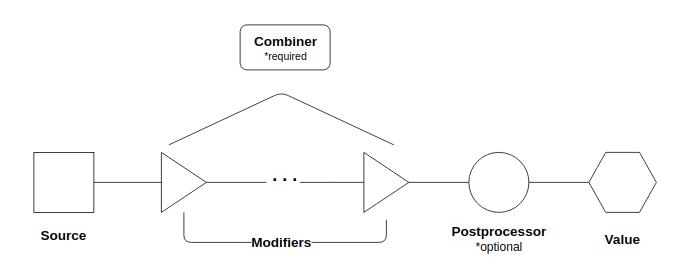
At the left, we have the original source of the pipeline. This is a callable registered by a single component that can return anything. To this source, additional components can register modifiers. These modifiers are also callables that can return anything.
The source and modifiers are composed into a single value by the combiner with which the pipeline is registered. The combiner is also a callable that can return anything - it is the function that dictates how the value produced by the source and the values produced by the modifiers will be combined into a single value. The combiner also determines the required signatures of modifiers in relation to the source. The values system provides three options for combiners, detailed in the following table.
Combiner |
Description |
Modifier Signature |
|---|---|---|
Replaces the output of the source or modifier with the output of the
next modifier. This is the default combiner if none is specified on
pipeline registration.
|
Arguments for the modifiers should be the same as the source with an
additional last argument of the results of the previous modifier.
|
|
The output of the source should be a list to which the results of the
modifiers are appended.
|
Modifiers should have the same signature as the source.
|
Pipelines may also optionally be registered with a postprocessor. This is a callable that can return anything that will be called on the output of the combiner to do some postprocessing.
Post-processor |
Description |
|---|---|
Used for pipelines that produce rates. Rescales the rates to the
size of the time step. Rates provided by source and modifiers are
presumed to be annual.
|
|
Used for pipelines that produce independent proportions or
probabilities. Combines values in a way that is consistent with a
union of the underlying sample space
|
What are attribute pipelines?
An attribute pipeline is a specific type of pipeline whose calculated value is an
attribute, i.e. a simulant-specific characterstic stored in the population state
table such as age, sex, or body-mass index. Attribute pipelines differ from generic
pipelines in that they (and their sources and postprocessors) must accept an index
representing the population of interest and return data in tabular form (i.e. a
pandas.DataFrame or pandas.Series) with the same index.
By far most pipelines used in Vivarium simulations are attribute pipelines.
Note
Note that the values system inverts the direction of control from information that is stored as private columns in the population manager. Components that update private columns via a population view can be seen as “pushing” that information out. Pipelines, however, are “pulled” on by components, often components that did not play any part in the construction of the pipeline value.
How to use pipelines
The values system provides a handful of interface methods, available off the builder during setup.
Method |
Description |
|---|---|
Registers a new pipeline with the values system. Provide a name for the
pipeline and a source. Optionally provide a combiner (defaults to
the replace combiner) and a postprocessor. Provide required resources (see note).
|
|
Registers a new attribute pipeline with the values system. Provide a name
for the attribute pipeline and a source. Optionally provide a combiner
(defaults to the replace combiner) and a postprocessor. Provide required
resources (see note).
|
|
A special case of
register_attribute_producerfor rates specifically.
Provide a name for the pipeline and a source and the values system will
automatically use the rescale postprocessor. Provide required resources (see note).
|
|
Registers a modifier to a pipeline. Provide a name for the pipeline to
modify and a modifier callable. Provide required resources (see note).
|
|
Registers a modifier to an attribute pipeline. Provide a name for the attribute
pipeline to modify and a modifier callable or name of an attribute pipeline
that does the modifying. Provide required resources (see note).
|
|
Retrieves the pipeline with the given name.
|
|
Retrieves a callable that in turn gets a dictionary of all attribute pipelines
registered with the values system. This method is intended to be used only
by backend managers as needed. Components should not need direct access
to attribute pipelines as attributes are obtained via population views.
|
Note
The registration methods for the values system require that any required resources be specified in order for the resource manager to properly order and manage dependencies. These required resources must include any private columns, other pipelines or attribute pipelines, randomness streams, and lookup tables that the source or modifier callables use in producing the value it returns.
For a view of the values system in action, see the disease model tutorial, specifically the mortality component.